

Hylki
Hyprlab
A fast, GNOME-native email client, built with Rust and libadwaita
Copied! Paste it into a terminal and press Enter to install.
About
This is a community package of Hylki, maintained independently and unaffiliated with Hyprlab; it is not Hyprlab's own Flatpak remote at hylki.hyprlab.co. It repackages Hyprlab's official Debian package unmodified, downloads it from Hyprlab's GitHub releases at install time, and follows their stable releases automatically.
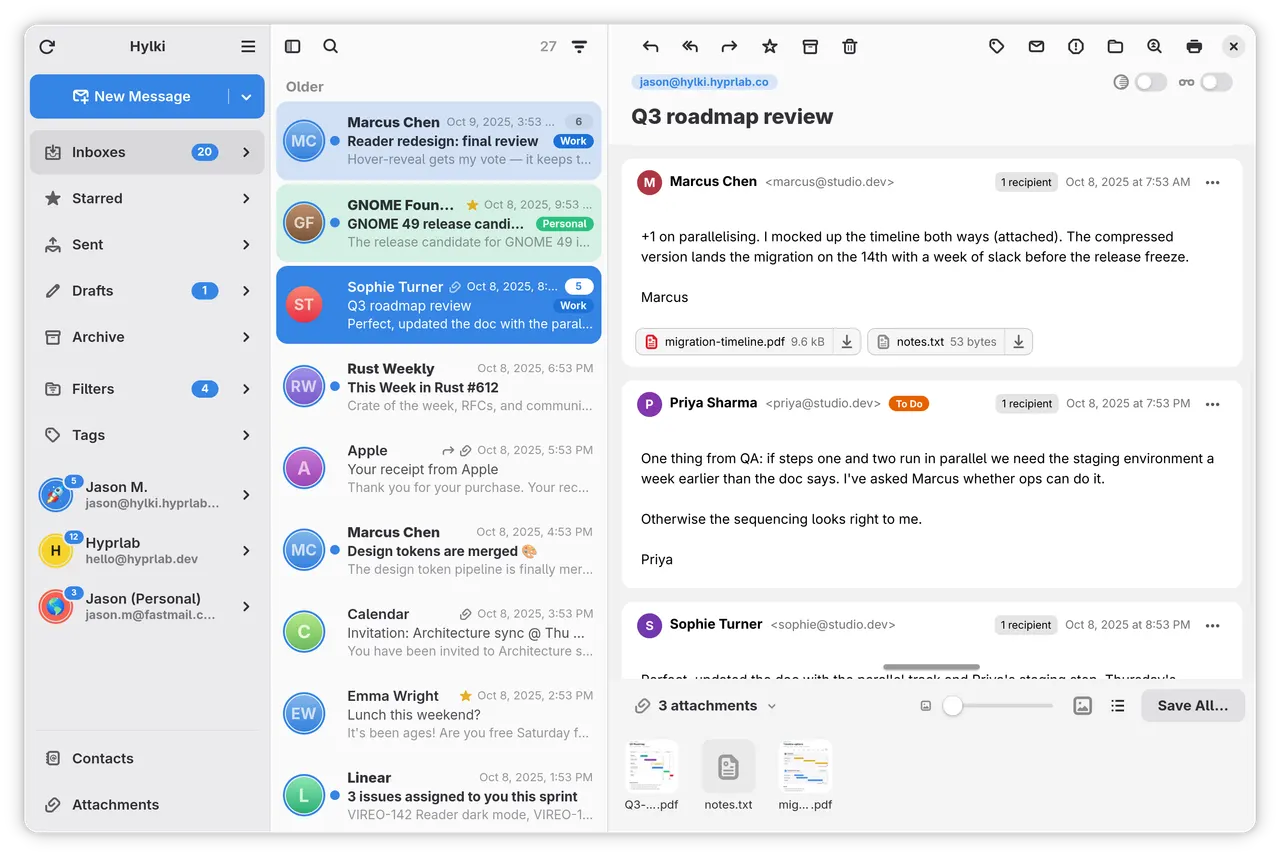
Hylki is a desktop email client for GNOME on Wayland, written in Rust with libadwaita. Your mail and credentials stay on your machine, remote content is blocked until you allow it, and there is no telemetry. It works with IMAP, POP3, JMAP and Microsoft 365, and with any server from iCloud to Proton Bridge to a Stalwart of your own.
Accounts and mail:
- Multiple accounts with a unified Inboxes view; Google, Microsoft and custom OAuth sign-in, or an account imported from GNOME Online Accounts
- Whole-mailbox sync and search, conversation threading, and changes made on other devices synced back
- Folder management, filters, tags, unified and filtered folders, and Trash and Junk emptied by hand or on a schedule
- An attachment gallery, an Outbox for sends that fail, and Send Later
Writing:
- Rich text, Markdown, HTML or plain text, with HTML signatures, inline images, spell check and undo
- Drafts, quote folding, split replies, and forwarding that keeps the attachments
- Large files uploaded to your own Nextcloud, OneDrive, Dropbox or Seafile; a Send with Hylki entry in GNOME Files
Reading:
- Reader View, your own font and colors, and per-message light or dark rendering
- OpenPGP signing, encryption and reading; DKIM, SPF and DMARC checked on arrival
- Meeting invitations answered in place, and one-click unsubscribe from list mail
The app:
- Adaptive three-pane layout, five appearance themes, Focus Mode, a customizable toolbar and swipe actions
- Gmail-style single-key shortcuts, notifications with actions, an optional tray icon and background running
- GNOME Contacts integration, your choice of language and clock, and passwords kept in the system keyring
Permissions: the display (Wayland, with X11 as a fallback), the GPU for the message view, the network for your mail servers, the system keyring for passwords and sign-in tokens, and GNOME Online Accounts, which is how Google accounts sign in. Files are attached and saved through the system file chooser, and attachments open in your other apps through the desktop portal. A few optional features need more access and are off by default; enable the ones you need with "flatpak override":
- New-mail sound:
flatpak override --user --socket=pulseaudio co.hyprlab.Hylki - Tray icon:
flatpak override --user --talk-name=org.kde.StatusNotifierWatcher co.hyprlab.Hylki - GNOME Contacts address books:
flatpak override --user --talk-name=org.gnome.evolution.dataserver.* --talk-name=org.gnome.Contacts --filesystem=xdg-data/evolution:ro --filesystem=xdg-cache/evolution:ro --filesystem=xdg-config/evolution:ro co.hyprlab.Hylki - OpenPGP with your GnuPG keyring and agent:
flatpak override --user --filesystem=~/.gnupg --filesystem=xdg-run/gnupg co.hyprlab.Hylki - The "Open Online Accounts" button:
flatpak override --user --talk-name=org.gnome.Settings co.hyprlab.Hylki - "Send by email" from a file manager, which passes file paths rather than files:
flatpak override --user --filesystem=home:ro --filesystem=/run/media:ro --filesystem=/media:ro co.hyprlab.Hylki - The GNOME Files extension:
flatpak override --user --talk-name=org.gnome.Nautilus --filesystem=xdg-data/nautilus-python/extensions:create co.hyprlab.Hylki - Showing another app icon in the dock and app grid:
flatpak override --user --filesystem=xdg-data/icons/hicolor:create --filesystem=xdg-data/applications:create co.hyprlab.Hylki - Microsoft sign-in on a managed device (Conditional Access):
flatpak override --user --talk-name=com.microsoft.identity.broker1 co.hyprlab.Hylki - Undo all of these:
flatpak override --user --reset co.hyprlab.Hylki
What's New
v1.47.1 · 2026-11-05A PDF with a password no longer freezes the app.
Details
- Developer
- Hyprlab
- License
- AGPL-3.0-or-later
- Runtime
- GNOME 51
- Architectures
- x86_64, aarch64
- Version
- 1.47.1 · 2026-11-05
- Website
- Homepage
- Source
- Hylki
- Packaging
- flatpark/registry
Permissions
1 to reviewNetwork access
Can reach the internet and local network
Inter-process communication
Shares the IPC namespace with the host
X11 (fallback)
Talk to org.freedesktop.secrets
Talk to org.gnome.OnlineAccounts
Wayland display
GPU acceleration
Packaging
AdaptedAdds components the runtime lacks
Shipped next to the app: poppler-glib