
已复制!粘贴到终端并按回车即可安装。
关于
This is a community package of PdfCraft, maintained independently and unaffiliated with the PdfCraft project. It repackages the official upstream Linux release build unmodified.
PdfCraft was called PrintCraft before. The rename changed the application identifier, so this package is a separate installation from the PrintCraft package (ai.storyteller.printcraft): its settings, recent files and recovery data stay in the old sandbox and are not carried over.
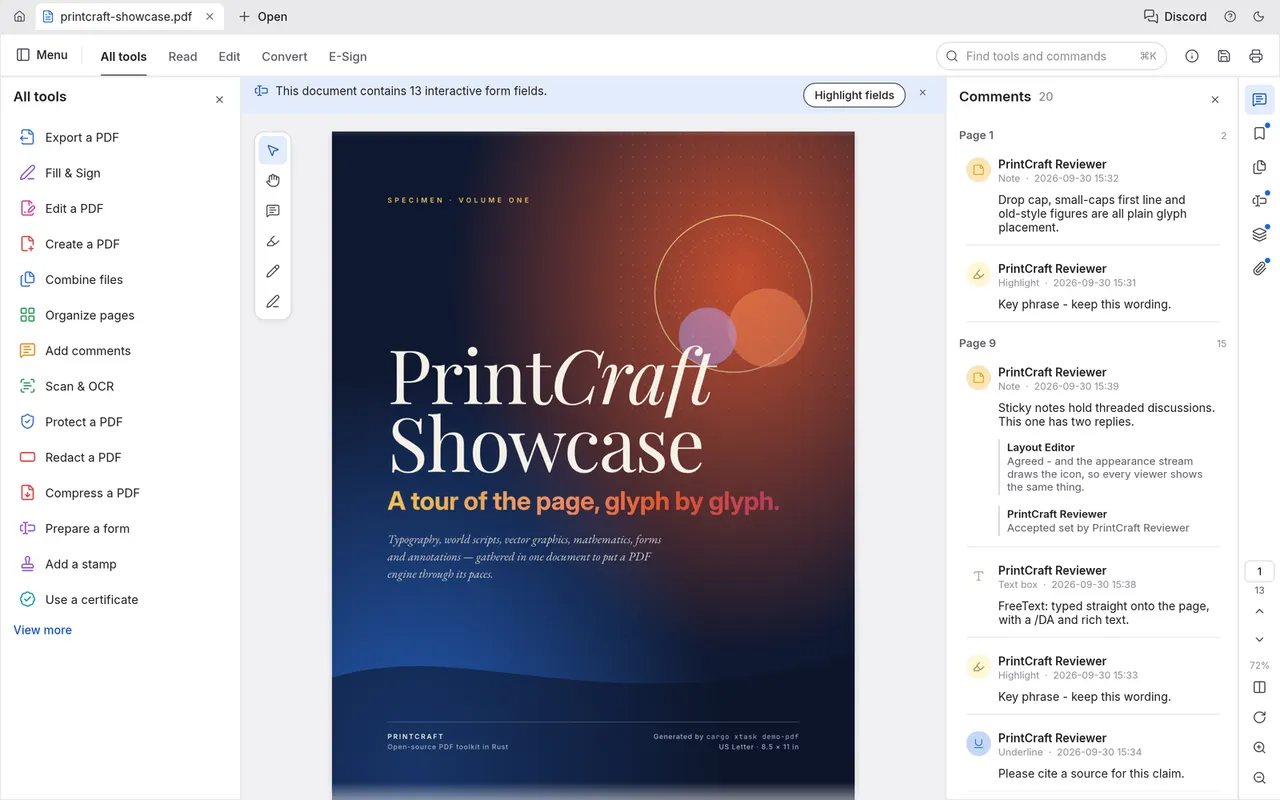
PdfCraft is an open-source, native PDF workbench written in Rust that follows the Adobe Acrobat workflow. Documents never leave your machine.
- Fast, sharp rendering with continuous, two-up and Read mode layouts
- Find, select and copy text; bookmarks and thumbnails for long documents
- Comment on, fill in and sign documents
- Rotate, delete, insert and reorder pages; combine and split documents
- Edit, redact, protect and export documents
- An opt-in MCP server for AI agents: pdfcraft-cli mcp
The headless command runner and MCP server is included: flatpak run --command=pdfcraft-cli ai.storyteller.pdfcraft --help
Permissions: display (Wayland, with X11 as a fallback), the GPU device, and the Documents and Downloads folders. Files anywhere else are opened and saved through the system file chooser. No network access is granted.
Optional overrides:
- Let agents on the host reach the
--controlautomation server:flatpak override --user --share=network ai.storyteller.pdfcraft - Open files by path anywhere in your home folder (command line, Open Recent):
flatpak override --user --filesystem=home ai.storyteller.pdfcraft
详情
权限
2 项需确认文件:xdg-documents
文件:xdg-download
X11(回退)
进程间通信
与主机共享 IPC 命名空间
Wayland 显示
GPU 加速