

Titanium Inspector
justcoding121专有
HTTP(S) debugging proxy with session grid, breakpoints and auto-responder
已复制!粘贴到终端并按回车即可安装。
关于
This is a community package of Titanium Inspector, maintained independently and unaffiliated with the Titanium Web Proxy project. It repackages the official upstream .deb unmodified and follows upstream releases automatically.
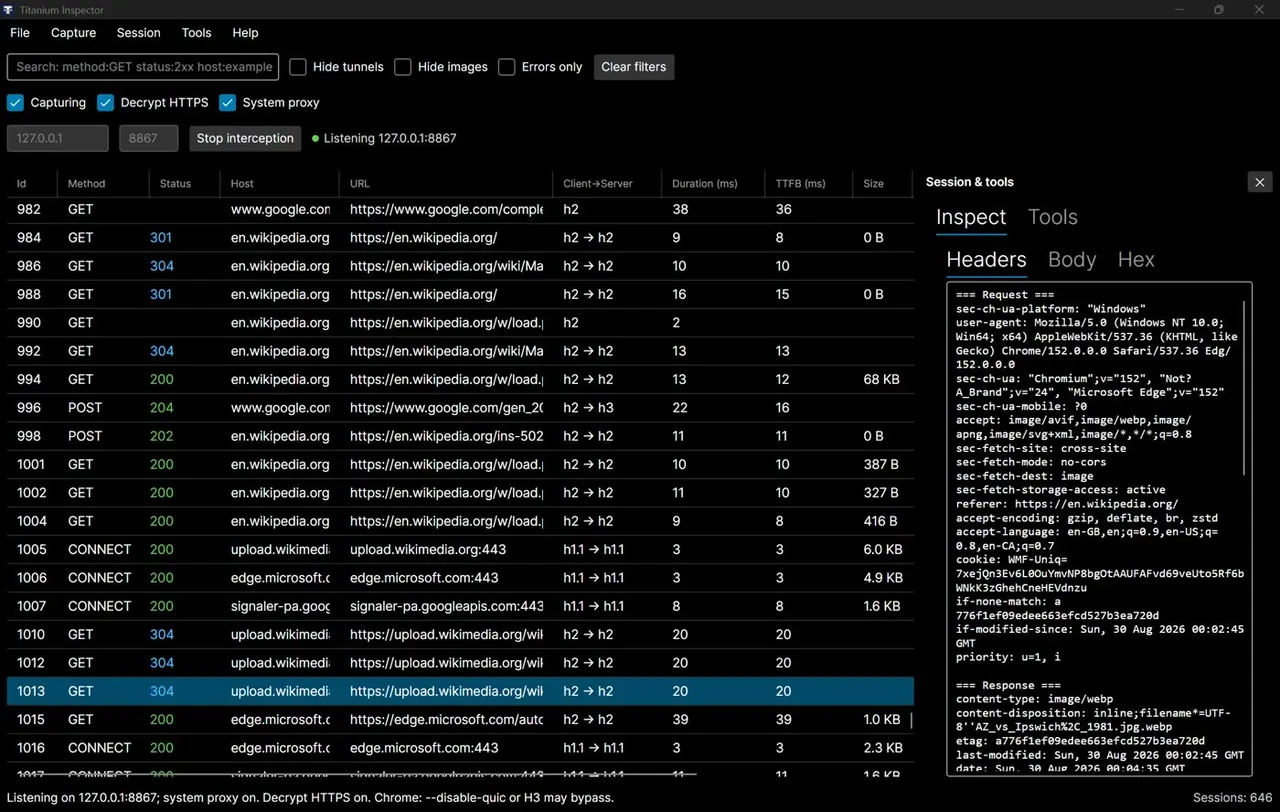
Titanium Inspector is a desktop man-in-the-middle debugger built on Titanium Web Proxy. Point a browser or any HTTP client at it and every request shows up in a live session grid, HTTPS included, where you can inspect, edit, replay and fake it.
- Session grid with request and response inspectors, search and filters.
- AutoResponder, Map Local and Map Remote rules, and request/response breakpoints.
- A Composer for hand-built requests, plus curl and fetch export.
- HTTP/2, WebSocket, gRPC and Server-Sent Events.
- HAR import and export.
Licence: Titanium Inspector is source-available under the PolyForm Noncommercial licence 1.0.0 — free for personal and educational use. Commercial use needs a licence from its author.
Permissions: this package grants network access (the proxy listens on a local port and forwards upstream) and the display. It grants no filesystem access; settings, captured sessions and the generated root certificate stay inside the sandbox, and exports go through the file chooser.
HTTPS decryption: when you switch on Decrypt HTTPS and choose Install, the root certificate is trusted in a certificate database private to this sandbox, never in your host's browser stores. To inspect a browser's HTTPS traffic, export the root certificate (Decrypt HTTPS prompt → Export CA) and import it as a trusted authority in that browser, then set the browser's HTTP and HTTPS proxy to the address shown in the app. The System proxy toggle does not change your desktop's proxy settings from inside the sandbox. Command-line tools usually pick the proxy up from http_proxy / https_proxy.
Scope: the optional HTTP/3 support uses the bundled msquic library, which needs libnuma; the Flatpak runtime does not ship it, so HTTP/3 is unavailable in this package. HTTP/1.1 and HTTP/2 are unaffected.
详情
- 开发者
- justcoding121
- 许可证
- PolyForm-Noncommercial-1.0.0
- 版本
- 7.0.11 · 2026-09-17
- 网站
- 主页
权限
2 项需确认X11 窗口系统
传统显示协议;可窥探其他 X11 窗口的输入
网络访问
可访问互联网和本地网络
进程间通信
与主机共享 IPC 命名空间
持久化存储:.pki
GPU 加速