

bottom
Clement Tsang
Monitor system resources and manage processes in the terminal
Copied! Paste it into a terminal and press Enter to install.
About
This community package downloads the official bottom release unmodified at install time.
The bottom binary runs on your host through flatpak-spawn, outside the Flatpak sandbox, with your user's normal access to files and processes. This allows host process monitoring and signaling. The permission also allows arbitrary host commands. Settings are stored separately in this app's Flatpak configuration directory.
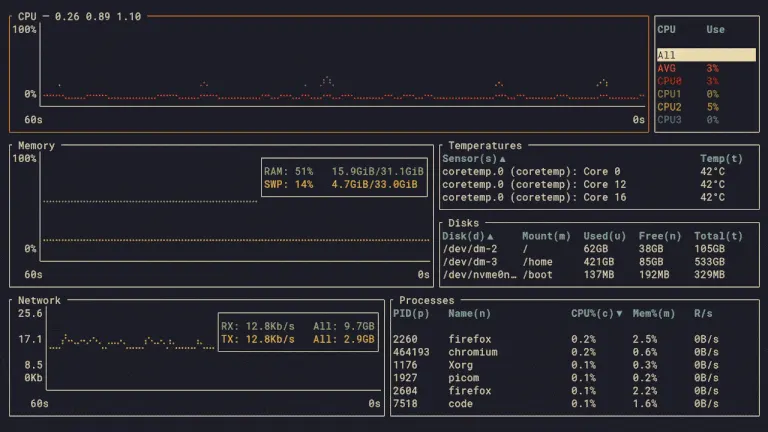
bottom is a customizable terminal system monitor with CPU, memory, network and disk graphs, temperature and battery information, and a searchable process table with sorting, tree mode and process signals.
Start it from your application menu or run flatpak run io.github.ClementTsang.bottom in a terminal. Press ? for help and q to quit. Update the package with Flatpak.
The default view inherits the terminal's foreground, background and ANSI accent colors, following its light and dark appearance while running. Non-style settings from the normal bottom configuration are included in a generated copy. An explicit --theme option, a separate --config_location file, or a styles section in the normal configuration takes precedence and disables this package default. Existing configuration files are preserved.
Details
- Developer
- Clement Tsang
- License
- MIT
- Runtime
- Freedesktop 26.08
- Architectures
- x86_64
- Version
- 0.15.0 · 2026-11-01
- Website
- Homepage
- Source
- bottom
- Packaging
- flatpark/registry
Permissions
1 to reviewTalk to org.freedesktop.Flatpak
Can run commands on the host via flatpak-spawn
Packaging
Reduced isolationRuns commands on your system
The official bottom binary runs on your system through flatpak-spawn to monitor and signal host processes. It runs with your user's host access, outside the Flatpak sandbox. Settings stay in the app's Flatpak configuration directory.
Presets app settings
The default view inherits your terminal's foreground, background and ANSI accent colors, following light/dark changes while running. A generated configuration copy preserves your non-style settings; explicit themes and custom styling take precedence.