

bottom
Clement Tsang
Monitor system resources and manage processes in the terminal
已复制!粘贴到终端并按回车即可安装。
关于
This community package downloads the official bottom release unmodified at install time.
The bottom binary runs on your host through flatpak-spawn, outside the Flatpak sandbox, with your user's normal access to files and processes. This allows host process monitoring and signaling. The permission also allows arbitrary host commands. Settings are stored separately in this app's Flatpak configuration directory.
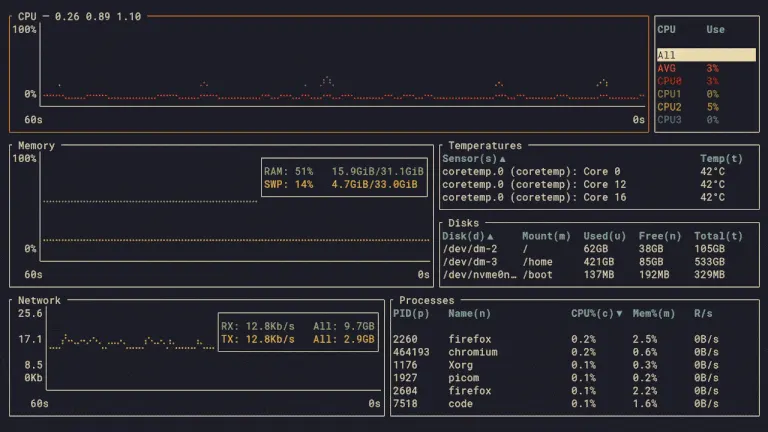
bottom is a customizable terminal system monitor with CPU, memory, network and disk graphs, temperature and battery information, and a searchable process table with sorting, tree mode and process signals.
Start it from your application menu or run flatpak run io.github.ClementTsang.bottom in a terminal. Press ? for help and q to quit. Update the package with Flatpak.
The default view inherits the terminal's foreground, background and ANSI accent colors, following its light and dark appearance while running. Non-style settings from the normal bottom configuration are included in a generated copy. An explicit --theme option, a separate --config_location file, or a styles section in the normal configuration takes precedence and disables this package default. Existing configuration files are preserved.
详情
权限
1 项需确认与 org.freedesktop.Flatpak 通信
可通过 flatpak-spawn 在主机上执行命令
打包方式
隔离降低在你的系统上执行命令
官方 bottom 程序通过 flatpak-spawn 在宿主系统上运行,以监控宿主进程并向其发送信号。它在 Flatpak 沙箱之外运行,具有当前用户的宿主访问权限。设置保存在应用的 Flatpak 配置目录中。
预设了应用设置
默认视图继承终端的前景色、背景色和 ANSI 强调色,在运行时跟随明暗主题变化。生成的配置副本保留你的非样式设置;显式指定的主题和自定义样式优先。